
You need tools that speed up content creation, improve discoverability, and give your site a professional edge. In this guide you’ll find seven vetted digital assets that cover themes, SEO suites, publishing engines, media platforms and visual plugins so you can focus on writing and growing your audience. Each pick targets a core blogger need — design, SEO, publishing automation, audio distribution, visual engagement, niche themes and full CMS control, so you can choose the right investment for your workflow and budget.
Top Picks
| Category | Product | Price | Score |
|---|---|---|---|
| 🏆 Best Site Builder | BeTheme | $60.00 | 97/100 |
| 🔍 Best SEO Toolbox | AtoZ SEO | $40.00 | 91/100 |
| 📰 Best For Publishers | Varient | $49.00 | 99/100 |
| 🎵 Best For Audio | BeMusic | $59.00 | 96/100 |
| 🎨 Best Carousel Plugin | Super Carousel | $21.00 | 82/100 |
| 👶 Best For Kids Niche | Happy Kids | $59.00 | 93/100 |
| 💼 Best All‑In‑One CMS | CMS Pro | $55.00 | 92/100 |
How We Picked These Tools
You want assets that save time, reduce technical friction, and help your content get found. We focused on practicality for bloggers: compatibility with WordPress or common hosting stacks; features that improve workflow (page builders, importable demos, automation or RSS support); SEO and performance impact; customization and design flexibility; ongoing updates and support; and price-to-value for solo creators and small teams.

Each product was evaluated for ease of setup, relevance to common blogging needs, extensibility (plugins, add-ons, themes), and the potential to speed up content production or increase audience reach.
BeTheme is a multipurpose WordPress and WooCommerce theme built to get sites live fast without starting from scratch. You get BeBuilder — a speedy page builder — plus 700+ pre-built websites and over 2,000 page designs so you can import a working demo and tweak it to fit your voice.
It’s handy for everyday uses like blogs, small shops, and portfolios, and it also scales for launch pages, agency sites, or client work. The theme bundles useful plugins (Slider Revolution, WPBakery) and deep customization options — headers, footers, skins, fonts — so you’ll spend less time fiddling and more time publishing.
If you want a reliable, flexible base that speeds up builds and keeps things looking polished, this is one of the more practical choices.
What People Say
Users often highlight how fast they can spin up a site using demo imports and the responsiveness of support when they need help with setup or custom CSS.
🗣️ muffingroup
At 1st the access you provided above, does not work properly as it is not admin access and we are not able to check anything.
2nd we reported above comment, because you shouldn`t sent details to your wp dashboard here. This is not private section and everyone can see it so you can have troubles in the future if someone will do something wrong with your website.
So please make admin access for us and send it private way. To send us private message, please use contact form which is in right bottom corner on http://themeforest.net/user/muffingroup but please also in message explain what should be checked because each day we got really many messages and we can`t remember who is who and what should be checked.
Thanks for understanding!
🗣️ muffingroup
You can do the same but custom css can be different because each theme is different, got different code and elements. You can try to re-paste code from Brandon and check yourself but we are not sure if this will work properly for all your elements.
Long-Term Costs
Buying a multipurpose theme like BeTheme cuts costs over time: you avoid recurring purchases for basic layout needs, get bundled premium plugins that would otherwise cost extra, and reduce development hours by importing demos and using ready-made elements.
ROI
The theme includes Slider Revolution ($29) and WPBakery ($64) values out of the box, so part of your investment is returned immediately in bundled tooling. Faster launches and fewer dev hours mean quicker monetization for shops, portfolios, and client sites.
Usability
| Aspect | Ease Level | Notes |
|---|---|---|
| Setup & Demo Import | Easy | One-click demo imports get a working site quickly; ideal if you want a head start. |
| Page Building (BeBuilder) | Easy | Drag & drop builder is designed to be fast and approachable for non-devs. |
| Theme Options & Customizer | Moderate | Lots of settings — powerful but can take time to learn for full customization. |
| Mobile Responsiveness | Easy | Responsive by default with retina support and mobile-specific tweaks. |
| WooCommerce Setup | Moderate | Shop templates are ready, but product-specific layouts may require some adjustments. |
Performance & Speed
BeTheme reports major optimizations making it roughly 3X faster after recent upgrades; there are built-in performance settings to fine-tune load times for users and search engines.
Integrations
| Software | Integration Quality |
|---|---|
| Elementor / Elementor Pro | Full compatibility |
| WooCommerce | Full compatibility with shop layouts |
| WPBakery Page Builder | Included with theme ($64 value) |
| Slider Revolution | Included with theme ($29 value) |
| WPML / Multilingual Plugins | Ready (plugin not included) |
Security
| Feature | Protection Level |
|---|---|
| GDPR 2.0 Ready | High |
| Regular updates & changelog | Good |
| Support Center with ticketing | Good |
| Clean, commented code | Moderate |
Collaboration
Support center, forum-based help, HD narrated videos and documentation make it straightforward to get help or onboard teammates.
Reporting & Analytics
Built-in SEO fields and compatibility with plugins like Yoast or Rank Math let you manage metadata; analytics are handled via plugins you choose (Google Analytics, etc.).
Key Benefits
- 700+ pre-built websites and 2,000+ page designs
- BeBuilder — fast drag & drop page builder
- WooCommerce ready with shop templates
- Deep customization: headers, skins, fonts, menus
- Bundled premium plugins (Slider Revolution, WPBakery)
Current Price: $60.00
Rating: 4.83
AtoZ SEO Tools puts a surprisingly deep toolkit at your fingertips so you can diagnose and fix SEO problems without jumping between services. You get everything from sitemap and robots generators to keyword position checks, plagiarism and page speed tools — handy whether you’re patching up a single post or running a small agency. Installation is straightforward, the admin panel gives you control over users and themes, and a free screenshot API saves you extra costs. If you want an all-in-one, self-hosted toolbox that you can tweak and extend, this is a practical pick you can set up and start using right away.
What People Say
Users highlight the breadth of tools and the ability to customize themes and add features. Several comments praise the script’s flexibility and confirm practical features like adblock detection.
🗣️ VERZEX
Very nice SEO tools Script, I’ve designed a new customized theme for AtoZ SEO Tools, check the new theme here: https://www.verzex.com/seo
Also I’ve developed the script to be more attractive and easy to use with adding some new features.
🗣️ Rainbowbalaji
Hello,
Yes it will detect adblocker.
Best Regards,
Long-Term Costs
Hosting this suite yourself cuts recurring third‑party tool subscriptions. The built-in screenshot API and free add-ons reduce extra costs, and bundled features like sitemap generation and analytics hooks mean fewer paid plugins over time.
ROI
At a one-time price, you get dozens of tools that would otherwise require monthly subscriptions. Faster issue diagnosis and fewer external tools mean you recoup the cost by saving time and tool fees within months.
Usability
| Aspect | Ease Level | Notes |
|---|---|---|
| Installation | Easy | Inbuilt installer walks you through setup in a few clicks; recommended PHP 8+ keeps it simple. |
| Admin Panel | Moderate | Powerful controls for users, themes and add-ons — there’s a short learning curve but it’s clear and capable. |
| Tool Access | Easy | Tools are grouped logically and searchable, so you can get to a checker or generator quickly. |
| Customization & Add-ons | Moderate | Themes and add-ons are supported; if you want heavy custom work you may need basic PHP/HTML skills. |
| Maintenance | Easy | Regular changelogs and an addon installer make updates and maintenance straightforward. |
Performance & Speed
The app has seen load and compatibility improvements across recent updates; performance is generally solid, though shared hosting or restricted server settings can slow some tools like screenshot generation.
Integrations
| Software | Integration Quality |
|---|---|
| Google Analytics | Good |
| Oauth Providers (Twitter, Facebook, Google) | Included / Works Well |
| SMTP / Native PHP Mail | Supported |
| Custom Add-ons & Themes | Flexible |
Security
| Feature | Protection Level |
|---|---|
| Captcha Protection | Good |
| Application-Level DDoS Detection | Moderate |
| Adblock Detection | Moderate |
| Regular Updates & Changelog | Good |
Collaboration
Documentation, demo admin access, addon marketplace and a support channel let you onboard teammates, share custom themes, and scale usage across clients.
Reporting & Analytics
Built-in SEO fields and compatibility with Google Analytics let you track visitors and queries; for deeper analytics you connect your preferred analytics platform.
Key Benefits
- 50+ built-in SEO and site analysis tools
- One-click installer and easy admin panel
- Oauth logins (Twitter, Facebook, Google)
- Free screenshot API and addon support
- Responsive and fully translatable
Current Price: $40.00
Rating: 4.57
Varient bundles a surprising amount of newsroom power into a self-hosted PHP script you can run on your own server. You get a clean, responsive front end and a deep admin panel that makes it easy to manage authors, schedule posts, and run automated feeds. It’s handy for a daily blog, a niche magazine or a mostly autopilot news site — the RSS aggregator and bulk-post tools mean you can keep a steady stream of content without babysitting every article.
For occasional features like quizzes, galleries or recipe posts, the built-in post types save you from stitching together plugins. If you want something that’s fast, SEO-aware and ready to scale with authors and ad spaces, Varient is a practical pick you can set up and start using right away.
What People Say
Buyers often praise the admin controls and multi‑author workflow, and they appreciate practical guidance from the developer on things like audio handling and RSS image options. Common notes: it’s feature‑rich but you’ll want decent hosting for heavier automation.
🗣️ Codingest
Hi, there is no time limit for the audios. The system cannot read audio files. You need to have FFmpeg to read video and audio files, but our script does not have this option. You are welcome 🙂
🗣️ Codingest
Hello, yes, you need to select “Show Images from Original Source” option if you want to update your feeds automatically. The server need to download the images, resize and upload back to S3. This needs time and if you try such a thing in a loop, it will probably cause the shared servers to be banned by their hosting providers. No, we do not plan to add these options.
Long-Term Costs
A one‑time purchase replaces several paid plugins and hosted services: built-in SEO tools, AI content hooks, RSS automation and S3 support reduce ongoing subscriptions. Over time you save on third‑party fees and keep full control of your content infrastructure.
ROI
You get a production-ready news stack for a single fee. If you monetize with ads, memberships or sponsored posts, the initial cost can be recovered quickly compared with monthly SaaS fees, especially if you already have basic hosting.
Usability
| Aspect | Ease Level | Notes |
|---|---|---|
| Installation | Moderate | Installer and docs help, but you’ll need PHP 8.1+ and a few extensions; a basic host can handle it but follow the requirements. |
| Admin Panel | Easy | Everything’s in one place — content, authors, ads and settings — so once you poke around it’s straightforward to manage daily publishing. |
| Multi-Author Workflow | Easy | Authors get their own panels and you can set roles and approvals, which makes collaboration simple for small teams. |
| RSS & Automation | Moderate | RSS aggregator and bulk upload save time, but automated image handling and frequent feed checks need careful hosting configuration. |
| Maintenance & Updates | Easy | The changelog is active and updates are regular; you’ll still want to test changes on staging before production. |
Performance & Speed
Recent updates focused on database optimizations and extra caching, so Varient performs well for typical newsroom use. For heavy RSS automation, large media libraries or many concurrent authors, choose solid hosting or you may notice slower feed processing.
Integrations
| Software | Integration Quality |
|---|---|
| OpenAI (AI Content Generator) | Included / Works Well |
| AWS S3 | Good |
| Google Indexing API | Good |
| Social Logins (Facebook, Google, VK) | Included |
| Google Analytics / Mail services | Supported |
Security
| Feature | Protection Level |
|---|---|
| CSRF Protection | Strong |
| XSS Prevention | Strong |
| Password Hashing & Secure Auth | Strong |
| Regular Security Updates | Good |
Collaboration
Built-in roles (Admin, Moderator, Author, User), dedicated author panels, comment moderation and an author reward system make it easy to run a small editorial team and manage contributions.
Reporting & Analytics
You get sitemap generation, Google Indexing API support and Google Analytics compatibility. Those basics cover indexing and traffic tracking; for deeper insights you can connect external analytics tools.
Key Benefits
- Responsive, SEO‑friendly design with structured data
- Multi-author roles and dedicated author panels
- Built-in RSS aggregator and bulk post upload
- AI content generator (OpenAI) for quick drafts
- PWA support and AWS S3 integration
- Flexible ad spaces and monetization options
- Multiple post types: article, video, audio, quizzes, recipes
Current Price: $49.00
Rating: 4.96
BeMusic gives you a ready-made music streaming site you can mold to your needs. You can let it run in automated mode to import artists, tracks and channels from third-party sources, or turn automation off and manually manage everything from the admin panel. It covers the essentials — uploads, user artist profiles, playlists, waveform generation, a full-featured player and dark mode — and includes a SaaS mode so you can charge subscriptions.
If you want a self-hosted music hub that’s faster to launch than building from scratch, BeMusic is a practical pick you can customize over time.
What People Say
Buyers tend to highlight the quick setup and how automation speeds content population, while also noting that some analytics and offline features are limited for now. Developer replies in the reviews clarify behavior like playlist queuing and plans for better charts.
🗣️ Vebto
If you mean the main “play” button on playlist page then yes, that would queue all playlist songs.
🗣️ Vebto
1. Not currently.
2, 3. This is tracked currently and we’re looking into adding better charts for visualizing this data with a future update.
Long-Term Costs
A single purchase gives you a full streaming stack you host yourself. That avoids recurring SaaS fees for basic streaming and membership features; over time you keep more revenue from subscriptions and ads since there’s no ongoing platform fee.
ROI
If you launch with the SaaS/subscription mode or sell premium artist plans, you can recoup the cost quickly. Compared with paying monthly for hosted streaming services, owning the code and running it on modest hosting can be cheaper long term.
Usability
| Aspect | Ease Level | Notes |
|---|---|---|
| Installation | Moderate | Installer and documentation make setup straightforward, but you need PHP 8.1+, MySQL and a couple of extensions. Expect some server configuration if you enable automation. |
| Admin Panel | Easy | Most site controls — content, menus, appearance and monetization — live in one panel with a WYSIWYG editor and live preview. |
| Automation | Moderate | Automated imports are powerful for seeding content, but they require careful setup and good hosting when pulling lots of data or streaming from external APIs. |
| Player & Playback | Easy | The player supports queueing, shuffle, repeat and lyrics. Playlist behavior is predictable and works out of the box. |
| Maintenance & Updates | Easy | Source code is provided and updates are issued, so routine maintenance is manageable if you follow the changelog. |
Performance & Speed
BeMusic is designed to be lightweight and fast out of the box. For best results enable caching, use decent hosting and be mindful when using heavy automation or large media libraries, which can increase load times.
Integrations
| Software | Integration Quality |
|---|---|
| YouTube API | Good |
| Social Logins (Facebook, Twitter, Google) | Included |
| Google Analytics | Included |
| SaaS / Payment Setup | Available (requires configuration) |
Security
| Feature | Protection Level |
|---|---|
| Authentication & Social Login | Strong |
| Roles & Permissions | Good |
| Disable Registration Option | Good |
| Source Code Access (for audits/custom fixes) | Good |
Collaboration
You can run a community with user artist profiles, followers, comments, reposts and playlists. Admin roles and permissions let you control contributions, and channel-based content makes it easy to feature curated collections.
Reporting & Analytics
Basic analytics and Google Analytics are integrated into the admin. Play tracking exists, but richer charts are limited today — you can augment reporting by connecting external analytics tools.
Key Benefits
- Automated importing and YouTube streaming via API
- Full content management and editable landing page
- User artist profiles, uploads and playlists
- Built-in SaaS subscriptions and monetization
- Realtime waveform generation for uploads
- Lightweight, responsive design with dark mode
- Player features: queue, shuffle, repeat and lyrics
Current Price: $59.00
Rating: 4.82
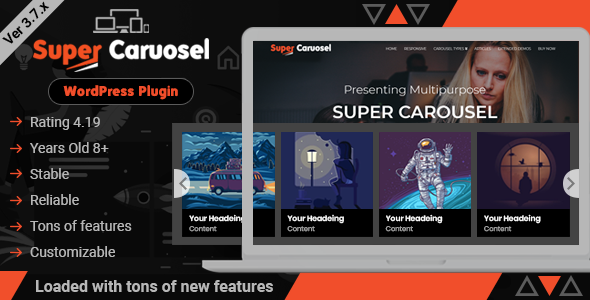
Super Carousel is a flexible slider plugin that makes it surprisingly simple to turn images, posts or external feeds into neat, responsive carousels. You can pull from your Media Library, WordPress posts, custom post types, YouTube, RSS or Flickr and tweak how many slides show at different screen sizes. The visual mode lets you style fonts, transitions and hover effects while an expert mode opens up custom HTML/CSS if you like to tinker. For everyday blogging you can use it to highlight recent posts, author teams, testimonials or product logos; for special occasions it’s handy for campaign galleries, video lineups or portfolio spotlights.
At $21 it’s a low-cost way to add dynamic visual interest to your site — just test settings on your theme and keep the plugin updated.
What People Say
Buyers often point out the plugin’s flexibility — it handles many content sources and responsive breakpoints well. The developer frequently replies in the comments with practical code snippets, though a few users note the documentation could be clearer and occasional front-end quirks have been reported.
🗣️ originalweb
Hi,
You can simply put below HTML.
Click HereTo initialise through jQuery
jQuery(document).ready(function() {
jQuery(SELECTOR).superLightBox({'mediaCaption': 'data-caption'});
});
Thanks!!
🗣️ GeorgSh
Hi,
is there a way I could do the following:
– have images in the carousel open in lightbox when clicked
– under the image, have a caption/text that opens an external link when clickedRight now it seems I can only have either the lightbox or the caption with the external link. When I add a link for the specific image it opens the link when clicking either the caption or the image. Is there a way to do this so the link only applies to the caption so the image would still open in the lightbox?
Long-Term Costs
This is a one-time purchase, so you avoid monthly slider or SaaS fees. For a small upfront cost you get a ready-made carousel system that can be reused across posts and campaigns; just budget a little time for updates and occasional compatibility tweaks with new WordPress or PHP versions.
ROI
At $21 you can quickly add attractive, interactive sections to multiple pages. That visual polish often boosts click-throughs and engagement, and it’s cheaper and faster than building custom slider functionality or hiring a developer for each new layout.
Usability
| Aspect | Ease Level | Notes |
|---|---|---|
| Installation | Moderate | Standard CodeCanyon install; you may need to register the purchase code and update the plugin. Keep an eye on compatibility with your theme and PHP version. |
| Creating Carousels | Easy | Drag-and-drop interface and content source presets make basic carousels fast to build from images, posts or feeds. |
| Visual Mode | Easy | Live styling for fonts, transitions and hover effects helps you see changes as you make them without touching code. |
| Expert Mode | Moderate | If you know HTML/CSS you can inject custom templates and styles for more advanced layouts. |
| Support & Docs | Moderate | Author replies include useful code examples, but some buyers have found the documentation could be clearer for certain edge cases. |
Performance & Speed
The plugin is built to be responsive and reasonably lightweight, but performance depends on how many carousels and heavy media you load. A few users reported front-end rendering or scrolling issues in specific cases, so test performance on your theme and enable optimizations like image compression and caching.
Integrations
| Software | Integration Quality |
|---|---|
| YouTube | Good |
| RSS Feeds | Good |
| Flickr | Good |
| WordPress Posts & Custom Posts | Excellent |
| Google Fonts | Included |
Security
| Feature | Protection Level |
|---|---|
| Regular bug fixes & updates | Good |
| PHP compatibility fixes (ongoing) | Good |
| Lightbox/media handling | Moderate |
| Source code access via purchase | Good |
Collaboration
Supports team and testimonial carousels plus widgets that make it easy to showcase multiple contributors or rotate partner logos; developer hooks (actions/filters) help if you want to extend behavior collaboratively.
Reporting & Analytics
No built-in analytics; rely on your existing site analytics (Google Analytics or plugins) to track engagement and clicks from carousels.
Key Benefits
- Responsive settings for different screen sizes (mobile, tablet, desktop)
- Supports Posts, Custom Posts, YouTube, RSS feeds, Flickr and Media Library
- Visual editor for live styling and Google Fonts support
- Built-in Super Gallery lightbox with touch swipe and pinch zoom
- Template system for saving, importing and reusing layouts
- Expert mode for custom HTML/CSS when you need extra control
- Multiple navigation styles: arrows, dots, touch, keyboard and mouse scroll
Current Price: $21.00
Rating: 4.11
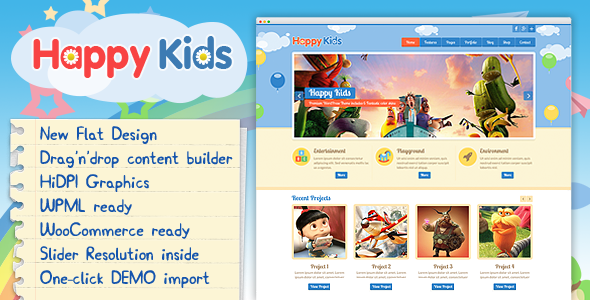
If you run a preschool, daycare or a kid-focused blog, Happy Kids is built to make setup quick and visually friendly. You get Elementor support, WooCommerce and WPML readiness, a one-click demo import and lots of prebuilt layouts so you can put up class pages, events, galleries and a small shop without starting from scratch.
For everyday use you’ll appreciate the visual editor and custom widgets when publishing schedules, teacher bios or photo galleries; for special occasions—open days, seasonal shows or enrollment campaigns—the sliders and portfolio pages help you put together engaging landing pages fast. At $59.00 it’s a cost-effective starting point, but plan for a couple of third-party plugins (some free, some with paid upgrades) so you can pick the exact features you need.
What People Say
Buyers often highlight the theme’s cheerful design and the ease of building pages with Elementor. Many praise the developer’s responsiveness in comments, while a few point out that you’ll likely need extra plugins for full functionality.
🗣️ pcavenue
When i add the widget “coverflow carousel” to my website in elementor, it comes with a blue tick and i cant remove it.
here a link https://www.loom.com/share/f360c4dd16924eb3bde77cfb92ecd0e7
Thanks
🗣️ johndagnell
Purchasers of this theme should be aware that in order to function it requires multiple plugins – some of which at least require accounts. Some of which are free basic versions with paid for upgrades.
Long-Term Costs
The theme itself is a one-time purchase at $59.00, which is affordable compared with hiring custom design work. Keep in mind additional costs can come from premium plugins, plugin upgrades, hosting and occasional paid add-ons—budget those when planning long-term.
ROI
For $59.00 you can launch a polished, child-friendly site quickly without a developer. That speed-to-launch and the included demo content reduce setup time, which is often the biggest cost for small organizations or solo bloggers.
Usability
| Aspect | Ease Level | Notes |
|---|---|---|
| Installation & Demo Import | Easy | One-click demo import gets content and layout in place quickly; standard ThemeForest install steps required. |
| Customization | Easy | Elementor makes editing pages and templates straightforward without touching code. |
| Required Plugins | Moderate | The theme relies on several plugins (some need accounts or premium upgrades), so expect a short plugin setup phase. |
| Media & Galleries | Moderate | Galleries and sliders are simple to use, but heavy images require optimization to keep pages speedy. |
| Support & Updates | Moderate | Author replies are frequent in the comments; updates have addressed compatibility and bugs over time. |
Performance & Speed
The theme is responsive and performs well on basic installs, but speed depends on how many sliders, galleries and third-party plugins you enable. Optimize images, enable caching and be cautious with heavy sliders to keep load times low.
Integrations
| Software | Integration Quality |
|---|---|
| Elementor | Excellent |
| WooCommerce | Excellent |
| WPML | Good |
| Revolution Slider | Included / Good |
| Contact Form 7 | Compatible |
Security
| Feature | Protection Level |
|---|---|
| Regular updates and changelog | Good |
| Ongoing PHP and WordPress compatibility fixes | Good |
| Dependence on third-party plugins | Moderate |
| Source package (images excluded) | Moderate |
Collaboration
Elementor and widget-based layouts make it easy for multiple team members to edit content; custom widgets and sidebars help organize contributions from teachers or staff.
Reporting & Analytics
No built-in analytics — you’ll use Google Analytics or a plugin to track visitors, form submissions and conversions.
Key Benefits
- Elementor visual builder for drag-and-drop editing
- Responsive layouts and multiple page templates
- WooCommerce and WPML ready for shops and translations
- One-click demo import to get your site live fast
- Unlimited color schemes and several background patterns
- Built-in widgets, galleries and portfolio pages
Current Price: $59.00
Rating: 4.67

If you want a compact, agency-friendly CMS that lets you build and manage small business sites without wrestling with code, CMS Pro is built for that. You get a modern page builder with drag-and-drop blocks, modular plugins you can enable per page, built-in gallery and commenting, membership and multiple payment gateways, plus a file manager and SEO options.
Use it day-to-day to publish pages, events or product lists quickly; for special projects—landing pages, campaigns or a small digital shop—its reusable blocks and premium modules speed things up. The developer has kept updates steady (recent releases bring a new framework and PHP 8.2+ support), so it’s a practical pick if you want something you can customize with plugins rather than rebuild from scratch. At $55.00 it’s a low upfront cost, though you may add premium modules if you need shop or advanced form features.
What People Say
Buyers frequently point out that CMS Pro is easy to set up and that many features—like plugins and the page builder—feel intuitive. A recurring theme in feedback is that the author provides practical fixes and guidance, especially for widget or third-party integration issues.
🗣️ gewa13
Rather than using 3rd party scripts, and hacking into cms pro core, a module or plugin would be a better choice. For FB post you can user their js API, which will work perfectly fine
🗣️ gewa13
Yes, refactor is fixed, as for twitter, there seems to be an issue when slide up effect is used on chrome only. Changing effect to fade or slide, will solve the problem. If you don’t know how to modify effect, please send me an email for instructions.
Long-Term Costs
At $55.00 you get a full CMS that covers hosting, updates and many built-in features without recurring licensing. Long term costs come from optional premium modules (blog manager, shop, forms), hosting, and occasional maintenance.
If you stick to core modules and handle small customizations yourself, the platform stays very budget-friendly.
ROI
You can launch client sites or a small business site fast, cutting development hours. That speed-to-live plus included features (payments, membership, page builder) usually pays back the $55.00 quickly compared with hiring bespoke dev work.
Usability
| Aspect | Ease Level | Notes |
|---|---|---|
| Installation & Setup | Moderate | Installer and demo credentials are provided, but you’ll want to check PHP/MySQL versions and follow the setup steps closely. |
| Page Builder & Editing | Easy | Drag-and-drop blocks and 100+ reusable sections make creating pages straightforward for non-technical users. |
| Plugins & Modules | Moderate | Adding or developing a plugin is supported and encouraged, but some integrations need a little familiarity with PHP or the provided hooks. |
| Membership & Payments | Easy | Multiple gateways are integrated (PayPal, Stripe, Payfast, Skrill) and subscription management is built in. |
| Support & Updates | Moderate | Author provides patches and notes; recent framework updates improved speed and security, but occasional bug fixes are still released. |
Performance & Speed
Recent updates moved CMS Pro to a new, faster framework and improved PHP compatibility (works with PHP 8.2+). Real-world speed will depend on your hosting and how many plugins/widgets you enable; optimize images and avoid heavy slider effects for the best results.
Integrations
| Software | Integration Quality |
|---|---|
| PayPal / Payfast / Skrill / Stripe | Excellent |
| Premium Modules (Blog Manager, Visual Forms, DigiShop) | Good |
| Google Analytics | Compatible |
| Third-party JS APIs (Facebook, Twitter) | Good (requires custom plugin or JS integration) |
Security
| Feature | Protection Level |
|---|---|
| Regular updates and changelog | Good |
| New framework with improved security | Good |
| Compatibility with PHP 8.2+ and MySQL improvements | Good |
| GDPR cookie consent and user permissions | Moderate |
Collaboration
You can assign granular admin permissions, have multiple editors, and use modular widgets so different people can work on pages without stepping on each other’s changes.
Reporting & Analytics
CMS Pro offers basic built-in stats and a transaction manager for payments; for deeper analytics you can add Google Analytics or another tracking tool via the configuration options.
Key Benefits
- Intuitive drag-and-drop page builder with reusable blocks
- Modular design: plugins and premium modules you can enable per page
- Responsive front end and admin themes
- Membership management and multiple payment gateways (PayPal, Stripe, Skrill, Payfast)
- Built-in gallery, comments and file manager
- SEO-friendly URLs, backups and multilingual support
Current Price: $55.00
Rating: 4.62
FAQ
How Do I Choose The Right Tool From The Seven For My Blog?
You should pick the tool that matches your platform and goals: if you run WordPress and want fast site building with hundreds of pre-built demos, BeTheme ($60.00) gives you BeBuilder, one‑click imports and WooCommerce/Elementor support so you can launch quickly; if you need an all-in-one CMS with modular plugins and page builder flexibility consider CMS Pro ($55.00); if you publish news, multi-author content or want an AI-assisted workflow, Varient ($49.00) is purpose-built for magazines; if your priority is in-site SEO diagnostics choose AtoZ SEO Tools ($40.00); for audio-focused or music communities BeMusic ($59.00) offers streaming and SaaS features; for visual promotion and sliders the WordPress-only Super Carousel ($21.00) integrates with posts and feeds; and Happy Kids ($59.00) is a niche theme if your blog targets childcare audiences. You can and often should combine products (for example a WordPress theme + a carousel plugin + an SEO script served on a subdomain) but make your first filter whether the product is a WordPress theme/plugin or a stand‑alone PHP script, because that determines hosting, installation and integration choices.
Will These Tools Work With My Hosting, WordPress Version Or PHP?
You need to check compatibility before you buy: WordPress themes and plugins like BeTheme, Super Carousel and Happy Kids require a compatible WordPress version (BeTheme lists full WordPress 6.7 compatibility and Elementor/WooCommerce compatibility in recent changelogs) and typical WordPress hosting (PHP 7.4+ or PHP 8.x on many setups). PHP scripts such as AtoZ SEO Tools, Varient and BeMusic explicitly require server-side prerequisites: AtoZ recommends PHP 7.4 or above with PDO, mbstring and GD, while Varient and BeMusic list PHP >= 8.1 and common extensions (cURL, Fileinfo, Exif).
Before purchasing, check the product requirements and your PHP/extensions, confirm that your host supports required ports (for WHOIS or APIs), and verify any plugin or theme compatibility with your active plugins. If you rely on third‑party integrations (Elementor, WooCommerce, Stripe, Social logins), confirm the plugin versions and check the vendor changelog and support threads for known issues.
How Do I Install, Customize And Keep These Tools Secure While Maximizing SEO And Performance?
You should install on a staging site first, import demos only after creating a fresh backup, and use a child theme or the provided page builder (BeBuilder/Elementor/WPBakery where included) for customizations so updates don’t overwrite changes. Use staging + regular backups, enable caching and lazy loading, and add a CDN for global speed; BeTheme explicitly lists performance settings and a suite of recent speed upgrades to help. For SEO, leverage built‑in SEO fields (many items include them) and complement them with a proven SEO plugin like Yoast or Rank Math; if you want on‑site diagnostic tools, install AtoZ SEO Tools on a subdomain or server instance so it doesn’t load on every page.
Keep everything secure by running supported PHP versions, applying vendor updates and security patches, limiting admin access (use private support channels rather than public comments), and following vendor support instructions — for example BeTheme’s support center and documented 24‑hour reply window. If you’re not confident with server or integration work, a short engagement with a developer will save time and protect your investment.
Wrapping Up
You now have a compact shortlist to upgrade your blogging toolkit in 2025. Choose BeTheme if you need unmatched pre-built layouts and a fast page builder to launch sites quickly.
Pick AtoZ SEO if you want an on-premise SEO toolbox to audit and optimize content. Use Varient when you need a publishing-grade script with RSS aggregation and AI generation for scale.
For audio-first projects, BeMusic gives you streaming, automation and monetization options. If visual engagement matters most, Super Carousel adds flexible, responsive carousels. For niche family or kids blogs, Happy Kids provides child-friendly templates and page layouts.
And if you want a single package that hosts content, membership and commerce, CMS Pro is the all-in-one option. Match your pick to your primary goal — design speed, SEO, publishing automation, audio distribution, visual polish, niche fit, or full CMS control — and you’ll unlock better productivity and audience growth.
| Product | Image | Rating | Key Highlights | Compatibility | User Support | Price |
|---|---|---|---|---|---|---|
| Betheme – Responsive Multipurpose WordPress Theme |
 |
4.83/5 (316912 reviews) |
|
|
Support available Monday-Friday, with responses within 24 hours. | $60.00 |
| AtoZ SEO Tools – Search Engine Optimization Tools |
 |
4.57/5 (5319 reviews) |
|
|
Direct support via email, with a knowledge base for common issues. | $40.00 |
| Varient – News & Magazine Script |
 |
4.96/5 (3526 reviews) |
|
|
Comprehensive documentation and community support. | $49.00 |
| BeMusic – Music Streaming Engine |
 |
4.82/5 (3491 reviews) |
|
|
In-depth documentation and active user community. | $59.00 |
This Roundup is reader-supported. When you click through links we may earn a referral commission on qualifying purchases.